There are two ways to set user
preferences in Empire Deluxe Internet Edition:
Setting the preferences for future commanders by selecting Help-New User Preferences in the main screen
Setting the preferences for your current commander by selecting Display-User Prefs [Alt_U] while in a game.
The future commander preferences will be the default preferences for all commanders created from here on. The in
game user preferences are used to change the preferences of the commander you are currently playing. The dialogs used for both are the same.
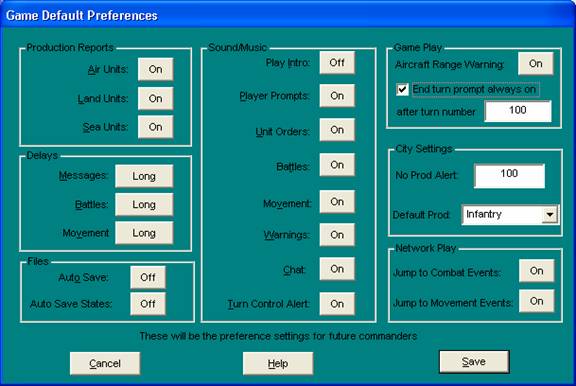
Empire Deluxe Preferences Screen
Production Reports allows you to turn off the reports for production of air,
land or sea units.
Delays
- allows you to set the time Empire Deluxe Internet Edition takes for
messages, battles and movement.
Files
gives you with options to turn on auto saving of games or auto saving of Turn
States.
Sound/Music
allows you to turn the sound effects, music and warning buzzers on and off. The
Sounds are:
Play
Intro: This option will enable/disable the playing of the introduction
music.
Player Prompts: This option will enable/disable the music played when it is
time for a player to take over the interface and play a turn.
Unit
Orders: This is music that plays when a unit is awaiting orders
Battles: These are the sounds that are heard when units fight in combat.
Movement: These are the sounds that are heard when a unit makes a move.
Warnings: This is the sound that is heard when the interface warns the
player about an event.
Chat:
This is the sound that is heard when an enemy computer player offers a
resignation or your human network opponents send you a chat message.
Turn
Control Alert: This I the sound that is heard when, in a network game, it is
time for the user to take control and play the game, but the user has a modal
dialog open in the interface, preventing the turn from beginning.
Game
Play allows you to set the Aircraft Out of Range Warning or force the
End Of Turn Prompt to happen every turn after a certain number of turns into
the game.
City Settings
allows you to set the default production
efficiency used in Production Alerts, and also set the default unit type shown
in the Production Window when a city has been award to you on turn one or
captured by your elite forces.
Network Play Allows you to set options that will only be used during Networked (IP) Play.
“Jump to Combat Events” will focus your attention on combat against you that
occurs during your opponent’s turn. “Jump to Movement Events” will focus your
attention on any enemy movement you can observe during your opponent’s turn.
If the preferences dialog is being accessed
during a game, the dialog will indicate the player who’s preferences are being
set. If it is being accessed from the main menu, it will indicate that the
preferences are being set for future players.
Once
you have selected the parameters by which you wish to use, you may save them for
future use by selecting the Save button from the Preferences screen.
© 2018 Killer Bee Software